WebSum
Production-minded web summarization pipeline: submit URLs via CLI/API, extract & clean page text, generate summaries, and store results with metadata. Includes SQLite-backed queue, worker processing, caching, structured retries, JSON logs/metrics hooks, and testable components—built to "run it, operate it."
Features
Fast summarization via heuristic-based key insight extraction
SQLite-backed queue for reliable, persistent job processing
Caching layer to avoid re-fetching and re-processing identical URLs
Structured retries with exponential backoff for transient failures
Multi-worker support for horizontal scaling
JSON logging for metrics, debugging, and observability
Stdlib-only dependencies (no heavy ML frameworks)
Requirements
Python 3.7+ with sqlite3 support
Network access to fetch URLs
Writable filesystem for SQLite database storage
Setup & Installation
1. Clone or download the repository
git clone https://github.com/satsonmusic/WebSum.git
cd WebSum
2. (Optional) Create a virtual environment
# On Windows (PowerShell)
python -m venv venv .\venv\Scripts\Activate.ps1
# On macOS/Linux
python3 -m venv venv source venv/bin/activate
3. Install dependencies
No external dependencies required—fully compatible with Python standard library.
Quick Start
One-shot URL Summarization
The simplest way to use WebSum:
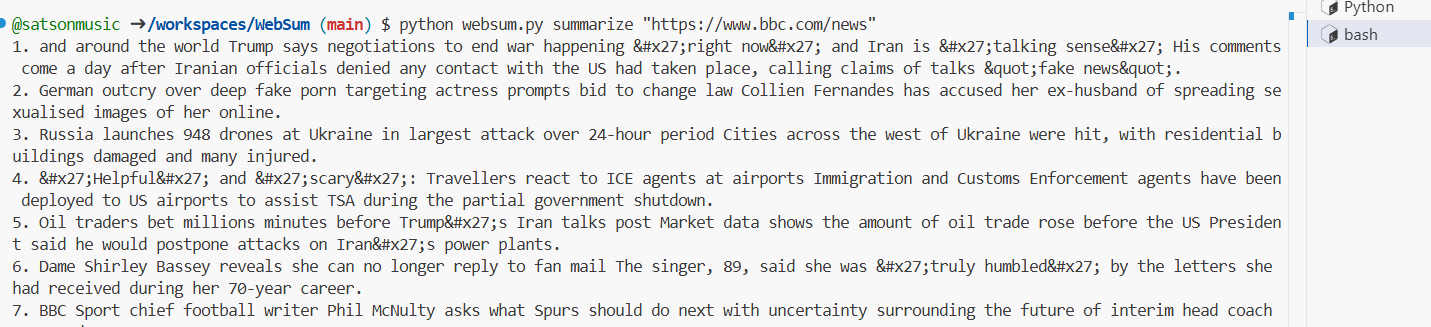
# Windows (PowerShell) python websum.py summarize "https://www.cnn.com" # macOS/Linux python3 websum.py summarize "https://www.cnn.com"
Output: A numbered list of key insights extracted from the page.
Example:
1. Breaking news on international developments. 2. Market analysis shows economic trends. 3. Technology sector updates reported today.
Customize Number of Insights
python websum.py summarize "https://www.example.com" --items 5
Ignore Cache and Re-fetch
python websum.py summarize "https://www.example.com" --no-cache
Set Custom Timeout
python websum.py summarize "https://www.example.com" --timeout-s 30
Advanced Usage
Enqueue a URL for Background Processing
Add a URL to the processing queue:
python websum.py enqueue "https://www.example.com" --priority 1 --max-attempts 5
Returns a job_id for tracking.
Run a Worker
Start a long-running worker that processes queued jobs:
python websum.py worker --worker-id "worker-1" --poll-s 1.0 --timeout-s 20
The worker will continuously:
Claim the next queued job
Fetch and summarize the URL
Cache the results
Mark the job as done or retry on failure
Retrieve a Cached Summary
python websum.py get "https://www.example.com"
Returns JSON with metadata:
{ "url": "https://www.example.com", "content_hash": "abc123...", "fetched_at": "2026-03-24T10:30:00+00:00", "extractor_version": "extract_v1", "model_version": "stub_v1", "summary": "1. First insight...\n2. Second insight..." }
Database
By default, WebSum stores the SQLite database at:
Windows: C:\Users\<username>\WebSum\pipeline.sqlite
macOS/Linux: Modify labroot() in websum.py as needed
The database includes two tables:
jobs: Queue status, retry tracking, locks
cache: Cached summaries with content hashes and metadata
Deployment
Single Worker Mode
python websum.py worker --worker-id "primary" --poll-s 2.0
Multiple Workers
Start multiple workers on the same or different machines pointing to the same database:
python websum.py worker --worker-id "worker-1" & python websum.py worker --worker-id "worker-2" &
Monitoring
All operations log structured JSON to stdout:
{"ts": "2026-03-24T10:30:45.123456+00:00", "event": "job_processed", "job_id": 42, "url": "https://...", "ms": 1234}
Capture and parse logs with your monitoring infrastracture.
Batch Processing via Queue
# Enqueue multiple URLs python websum.py enqueue "https://example1.com" --priority 5 python websum.py enqueue "https://example2.com" --priority 3 python websum.py enqueue "https://example3.com" --priority 1 # Start a worker to process them python websum.py worker --worker-id "main"
Rebuild Cache
# Force re-fetch and re-summarize python websum.py summarize "https://example.com" --no-cache
Architecture
Fetch Module: HTTP client with charset detection and configurable timeout
Extract Module: Lightweight HTML-to-text converter (stdlib only)
Summarize Module: Heuristic TF-IDF-style scoring for key sentences
Storage: SQLite with WAL journal mode for concurrent access
Queue: Atomic operations with job locking and exponential backoff retries
Worker: Long-running process that claims and processes jobs
EXAMPLE